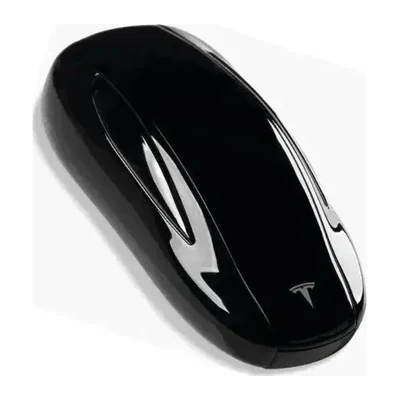
Tesla Model X Key Fob Battery Replacement

2016-2025 Models

This vehicle has multiple key fob types. Select your key below.
Most Common

Smart Key Fob – FCC ID 2AEIM-1048598 (2016–2020)

2016-2025 Tesla Model X Smart Key Fob – FCC ID 2AEIM-1048598 (2016–2020)
Battery Type
CR2354
Buy CR2354 on Amazon
✓ OEM Compatible
✓ Free Prime Shipping
Tesla Model X Smart Key Fob – FCC ID 2AEIM-1048598 (2016–2020) Battery Replacement Video
FCC ID: 2AEIM-1048598
Replacement Steps for Smart Key Fob – FCC ID 2AEIM-1048598 (2016–2020)

Tools needed: Small flathead screwdriver

Open the case Fit a small flathead screwdriver into the notch and twist gently until the halves separate. Work along the edge instead of forcing one spot.
Take out the old battery Note which way the CR2354 faces, then lift it out with a fingernail or a small screwdriver tip.
Fit the new battery Put the new CR2354 in with the positive (+) side facing the same way as the old one, and press it flat into its holder.
Close it up and test Line up the halves and press until they click, then try lock and unlock from a few feet away.
Alternative

Smart Key Fob – FCC ID 2AEIM-1614285 (2021–2025)

2016-2025 Tesla Model X Smart Key Fob – FCC ID 2AEIM-1614285 (2021–2025)
Battery Type
CR2354
Buy CR2354 on Amazon
✓ OEM Compatible
✓ Free Prime Shipping
Tesla Model X Smart Key Fob – FCC ID 2AEIM-1614285 (2021–2025) Battery Replacement Video
FCC ID: 2AEIM-1614285
Replacement Steps for Smart Key Fob – FCC ID 2AEIM-1614285 (2021–2025)

Tools needed: Small flathead screwdriver

Open the case Fit a small flathead screwdriver into the seam between the two halves and twist gently until the halves separate. Work along the edge instead of forcing one spot.
Take out the old battery Note which way the CR2354 faces, then lift it out with a fingernail or a small screwdriver tip.
Fit the new battery Put the new CR2354 in with the positive (+) side facing up, and press it flat into its holder.
Close it up and test Line up the halves and press until they click, then try lock and unlock from a few feet away.

Frequently Asked Questions

What battery does a Tesla Model X key fob use?

The 2016-2025 Tesla Model X key fob uses a CR2354 3-volt lithium coin battery. This is a standard battery available at most grocery stores, pharmacies, and online retailers.

How do I know if my Tesla Model X key fob battery is dying?

Signs your Tesla Model X key fob battery is dying include: reduced range (having to get closer to unlock), intermittent button response, delayed unlocking, the low battery warning on your dashboard, or buttons requiring multiple presses to work.

How long does a Tesla Model X key fob battery last?

A Tesla Model X key fob battery typically lasts 2-4 years depending on usage. Frequent use, extreme temperatures, and proximity to electronic devices can shorten battery life.

Can I replace my Tesla Model X key fob battery myself?

Yes, replacing a Tesla Model X key fob battery is a simple DIY task that takes under 5 minutes. You only need a new CR2354 battery and optionally a small flathead screwdriver. No dealer visit or programming is required.

Do I need to reprogram my key fob after replacing the battery?

No, you do not need to reprogram your Tesla Model X key fob after replacing the battery. The fob retains its programming during battery changes. Simply insert the new battery and test the buttons.

Where can I buy a CR2354 battery?

CR2354 batteries are available at Walmart, Target, CVS, Walgreens, Amazon, auto parts stores like AutoZone and O'Reilly, and most grocery stores. They typically cost $6-12 for a 2-pack.